Spectral Unmixing for BD FACSDiscover S8, Cytek Aurora, Sony ID7000
Full-spectrum cytometers generate 60–107 detector channels per event. Built-in instrument software (Chorus, SpectroFlo) handles unmixing inside the acquisition workflow, but downstream analysis of unmixed data is often the bottleneck. FlowVision is the analysis layer purpose-built for spectral output — with a complete standalone unmixing pipeline shipping in v1.7.1, available now.
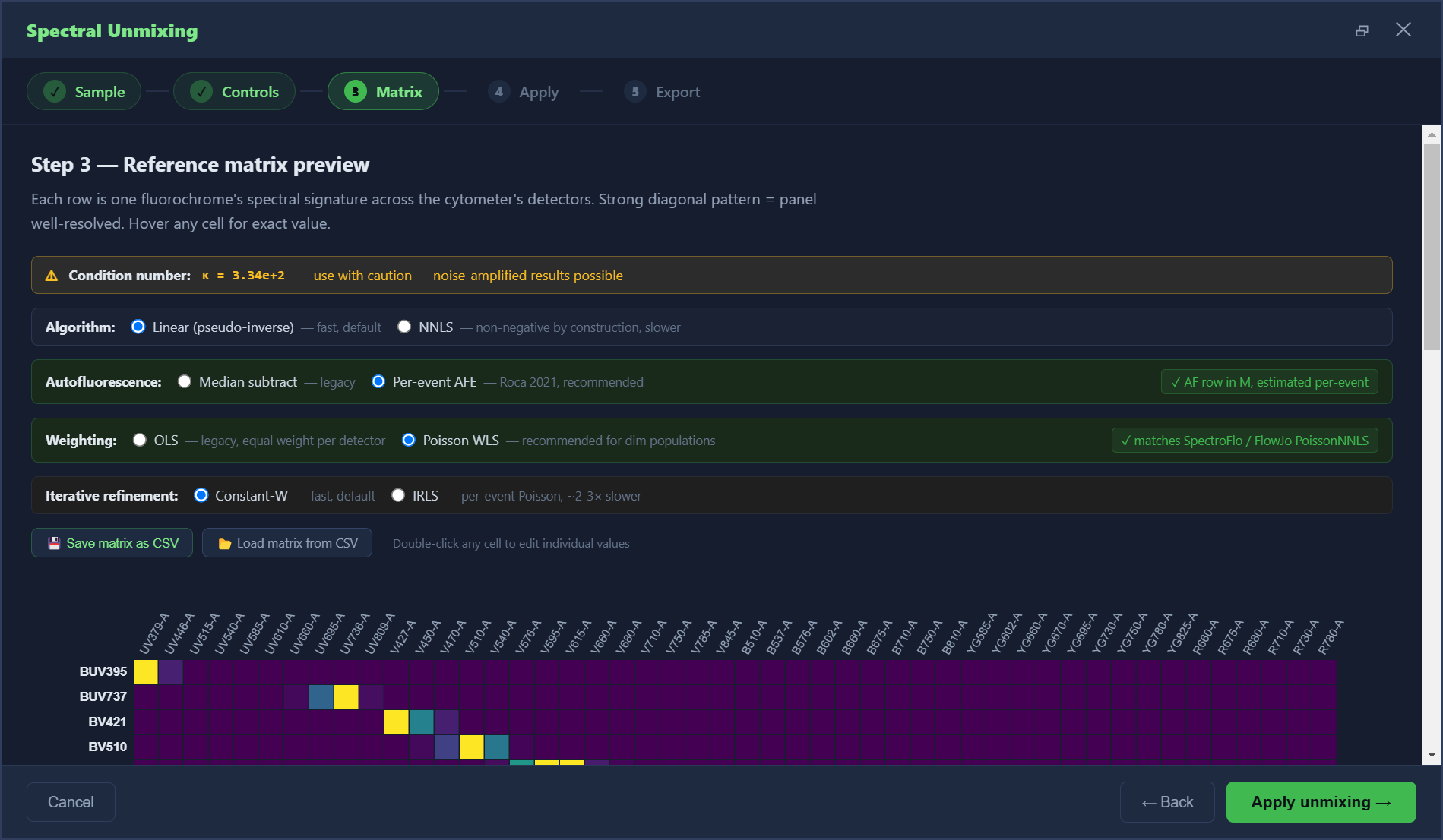
What's in the unmixing pipeline (v1.7.1, shipping now)
Linear (pseudo-inverse) + NNLS algorithms
Choose Moore-Penrose pseudo-inverse for fast Linear Unmixing (matches SpectroFlo's default, ~1 s per million events) or NNLS for rigorous non-negative results required for publication. One-click toggle.
Auto-build reference matrix from single-color controls
Drop your single-color FCS files (one per fluorochrome) — FlowVision extracts the spectral signature using a top-decile mean peak detector. Verified end-to-end on real 24-color Cytek panels.
Per-fluor peak detector override
Auto-detect picks a reasonable default, but analysts always tweak for tandem dyes (BV711, PE-Cy7, BV421-A700). One dropdown per row — change in one click. Industry-mandatory; SpectroFlo and OMIQ both expose it.
Manual matrix cell edit
Double-click any cell in the reference heatmap to edit its value directly. For spread compensation, zeroing out a contaminated control row, fine-tuning a tandem dye's tail.
SpectroFlo-compatible CSV save / load
💾 Save the reference matrix as CSV (header row = detector names, one row per fluorochrome). 📂 Load matrices exported from SpectroFlo or shared by a colleague. Interoperable with the rest of your workflow.
NNLS non-convergence warning
If >0.1 % of events fail NNLS convergence — usually a sign of rank-deficient panel (two fluors with near-identical spectra) — an amber banner alerts you immediately, with diagnostic detail per row.
Export compensated FCS 3.2 / 3.1
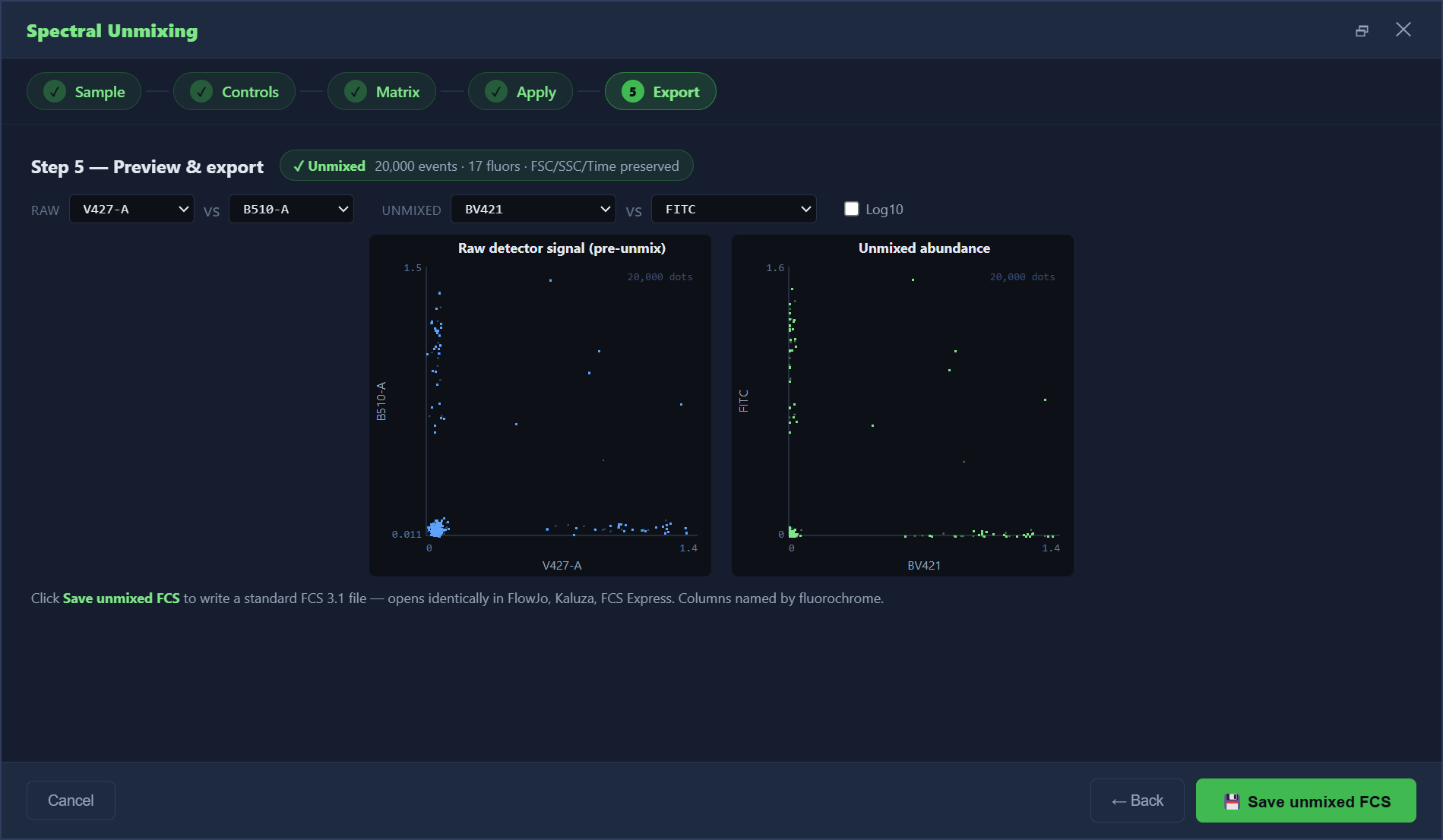
One-click export of the unmixed file as standard FCS 3.1 or 3.2. Open in FlowJo, Kaluza, FCS Express — interoperable with the rest of your stack.
Workspace preserves the matrix
Save your .fvw workspace and the active spectral reference matrix is persisted. Reopen tomorrow and your panel is ready — no re-loading single-color FCS files.
Supported instruments
- BD FACSDiscover S8 — 64 detectors. Built-in Chorus software handles unmixing but downstream analysis is often the bottleneck. FlowVision is the analysis layer.
- Cytek Aurora / Northern Lights — Up to 64 detectors. SpectroFlo native, but many labs want a standalone analysis tool independent of acquisition software.
- Sony ID7000 — Up to 186 detectors. Sony's native software is excellent but FlowVision adds the lifetime-license analysis path.
- Hybrid conventional + spectral systems — FlowVision handles both modes from the same workspace.
- Conventional cytometers (BD, Beckman Coulter CytoFLEX / DxFLEX, and others) — Spectral unmixing is available for these too if you have a multi-fluorochrome panel with spectral overlap, not just spillover.
How is this different from Chorus / SpectroFlo?
Chorus (BD) and SpectroFlo (Cytek) are excellent at acquisition-time unmixing — they're tightly integrated with the instrument and read the spectral library from the cytometer directly. They are not, however, designed for downstream analysis: gating workflows, batch analysis across many samples, per-sample report generation, and standardized export to FCS Express / FlowJo are second-class citizens.
FlowVision sits downstream or replaces the unmixing step entirely. You can unmix in Chorus/SpectroFlo and import the already-unmixed FCS for analysis, OR use FlowVision's own unmixing pipeline (auto-build matrix from your single-color controls, override any auto-detected peak, run linear or NNLS, export FCS 3.1/3.2). Then do gating, batch analysis, MFI statistics, multi-file layout reports, UMAP embedding, and PDF/Excel export in the same workspace. The 2/3-column MFI Stats Table for 60–107 channel panels fits comfortably on a single A4 page — a feature explicitly designed for spectral panels.
Pricing
$99 lifetime — Founder tier (first 20 spots). $149 Early Adopter (next 30 spots). $199 Standard (after that). Free updates for all v1.x versions. Spectral unmixing is included in every license tier.